estonian-scrabble
Estonian Scrabble



Important Note: This documentation is AI-generated. The entire project, including all documentation files, README guides, and development notes, was created through AI-assisted programming using Cursor IDE’s agent mode with Claude-3.5-Sonnet model. The development process was conducted as an experiment in “YOLO mode” where the AI agent was responsible for code generation, documentation writing, and debugging assistance.
A Python-based implementation of the classic Scrabble board game, specifically designed for the Estonian language. Features include Estonian alphabet support (õ, ä, ö, ü, š, ž), Estonian wordlist validation, and a modern graphical user interface.
View on GitHub: github.com/klauseduard/estonian-scrabble
Keywords: scrabble, estonian language, word game, python game, desktop application, educational game, language learning
Prerequisites
Before you begin, ensure you have the following installed:
- Python 3.8 or higher
- Windows: Download and install from python.org
- Linux: Usually pre-installed, or install via package manager:
sudo apt-get install python3 # For Ubuntu/Debian sudo dnf install python3 # For Fedora - macOS: Install via Homebrew:
brew install python3
- pip (Python package installer)
- Usually comes with Python installation
- To verify, open terminal/command prompt and run:
pip --version # or pip3 --version
Installation
- Download the Game
- Download this repository as a ZIP file and extract it
- Or if you’re familiar with git:
git clone https://github.com/klauseduard/estonian-scrabble.git
cd estonian-scrabble
- Open Terminal/Command Prompt
- Windows: Press Win+R, type
cmd, press Enter - macOS: Press Cmd+Space, type
terminal, press Enter - Linux: Press Ctrl+Alt+T
- Windows: Press Win+R, type
- Navigate to Game Directory
cd path/to/scrabble # Replace with actual path - Install Dependencies
pip install -r requirements.txt # or pip3 install -r requirements.txt - Run the Game
python main.py # or python3 main.py
How to Play
- Starting the Game
- Run the game using the command above
- The game window will open with an empty board
- Two players take turns
- Game Controls
- Mouse Controls:
- Left-click and hold to drag tiles from your rack to the board
- Release left mouse button to place a tile
- Right-click a tile on the board to return it to your rack
- Left-click buttons (“Commit”, “Pass”, “Exchange”) to perform actions
- Click “Commit” to end your turn when you’re satisfied with your word placement
- Click “Pass” to skip your turn
- Click “Exchange” to swap tiles (counts as your turn)
- Mouse Controls:
- First Move
- Must place tiles through the center square
- Must form a valid Estonian word
- Word must read left-to-right or top-to-bottom
- Subsequent Moves
- New tiles must connect to existing words
- All formed words must be valid Estonian words
- Words read left-to-right or top-to-bottom
Screenshots
Game Interface
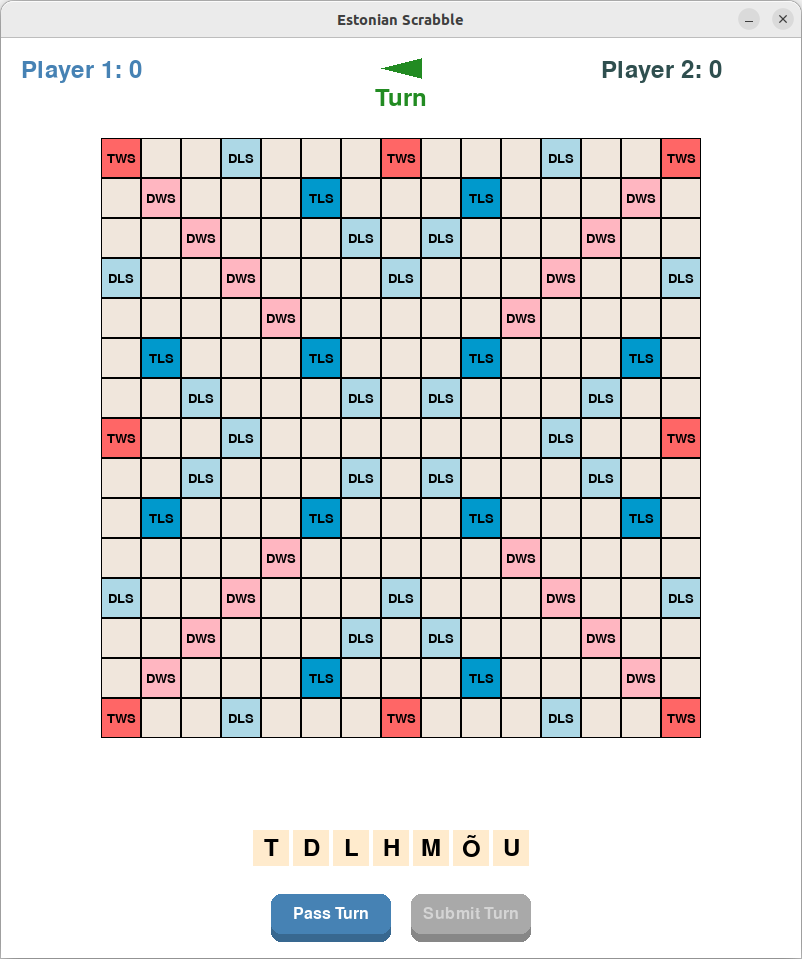 Initial game board showing premium squares
 Player’s tile rack and game controls
Word Placement
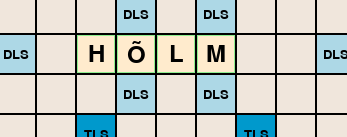 Example of a valid word placement (green highlight)
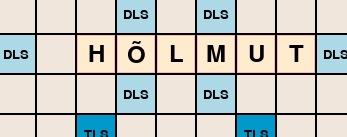 Example of an invalid word placement (red highlight)
Game Progress
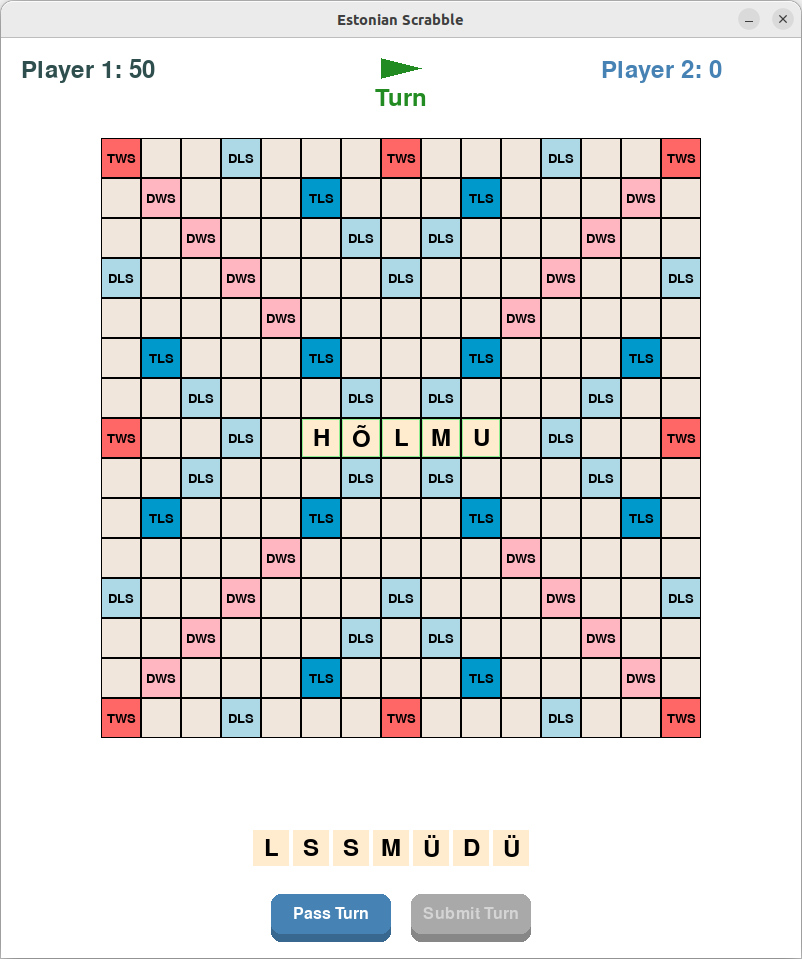 Valid first move through the center square
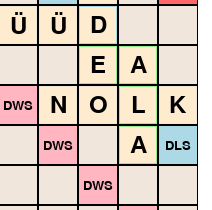 Forming multiple valid words in one move
Troubleshooting
Common Issues
- “Python not found” or similar error
- Make sure Python is installed and added to PATH
- Try using
python3instead ofpython - Restart your terminal/command prompt
- “pip not found” error
- Make sure pip is installed
- Try using
pip3instead ofpip - On Windows, try:
py -m pip install -r requirements.txt
- Game doesn’t start
- Make sure all dependencies are installed
- Try reinstalling dependencies:
pip uninstall -r requirements.txt
pip install -r requirements.txt
- Estonian characters don’t display correctly
- Make sure your system supports UTF-8
- Try updating your terminal/command prompt font
Getting Help
If you encounter any issues:
- Check the troubleshooting section above
- Look for similar issues in the project’s issue tracker
- Create a new issue with:
- Your operating system
- Python version (
python --version) - Error message (if any)
- Steps to reproduce the problem
Features
- Full Estonian alphabet support including õ, ä, ö, ü, š, ž
- Visual feedback for valid/invalid word placements
- Drag-and-drop tile placement
- Real-time word validation
- Premium square scoring system
- Support for two players
Project Structure
scrabble/
├── game/                   # Game logic and state management
│   ├── __init__.py        # Package exports
│   ├── constants.py       # Game constants (letter distribution, premium squares)
│   ├── state.py          # Core game state management
│   └── word_validator.py  # Word validation logic
├── ui/                    # User interface components
│   ├── __init__.py       # Package exports
│   └── components.py     # UI components (Board, Tile, Rack)
├── main.py               # Main game entry point
├── requirements.txt      # Python dependencies
└── README.md            # This file
Game Rules
- The game follows standard Scrabble rules with adaptations for Estonian alphabet
- Supports Estonian special characters (õ, ä, ö, ü, š, ž)
- Uses Estonian wordlist for word validation
- Premium squares follow standard Scrabble board layout
Development
Architecture
The project follows a modular architecture with clear separation of concerns:
- Game Logic (
game/):state.py: Manages game state, player turns, and tile placementword_validator.py: Handles word validation and scoringconstants.py: Contains game constants and configuration
- User Interface (
ui/):components.py: Reusable UI components- Handles user input and visual feedback
Running Tests
The project includes automated tests to verify game logic and behavior:
# Run all tests
python3 -m unittest discover tests

# Run specific test file
python3 -m unittest tests/test_word_validator.py

# Run tests with verbose output
python3 -m unittest -v tests/test_word_validator.py
Key test areas:
- Word validation and scoring
- Tile placement rules
- Game state management
Adding New Features
When adding new features:
- Determine which module should contain the new code
- Add appropriate tests
- Follow the existing code style
- Update documentation
Code Style
- Use type hints for function parameters and return values
- Follow PEP 8 guidelines
- Write docstrings for classes and functions
- Keep functions focused and single-purpose
Contributing
- Fork the repository
- Create a feature branch
- Make your changes
- Submit a pull request
Future Improvements
Note: The following improvements were suggested by the AI agent during development. The human developer was mostly focused on getting the basic game working! Feel free to implement any of these if you’re interested.
✅ Implemented:
- Estonian wordlist integration
- Basic scoring system with premium squares
- Real-time word validation
🚀 AI’s Wishlist:
- Enhanced Word Validation:
- Add support for compound words
- Implement word challenges between players
- Cache validated words for performance
- Game Features:
- Save/load game state
- Undo/redo moves
- Game replay functionality
- Tournament mode with time limits
- Statistics tracking (highest scores, longest words, etc.)
- Multiplayer:
- Network play support
- Lobby system for finding opponents
- Chat functionality
- Player rankings
- AI Features:
- AI opponent with adjustable difficulty
- AI move suggestions for learning
- Analysis of played games
- Technical Improvements:
- Unit test coverage
- Performance optimizations
- Proper logging system
- Configurable game rules
- Cross-platform packaging
- UI Enhancements:
- Animations for tile placement
- Sound effects
- Dark/light theme support
- Mobile-friendly responsive design
- Accessibility features
License
This project is open source and available under the MIT License.